Tuesday, February 28, 2006

Common Patterns - Web Modules

Introduction

The following is the first post in a discussion on the common web design patterns and processes that I think Composer should support natively.

The patterns that I am looking to promote initially are based purely on PIAs (paged internet applications), at this stage RIAs (rich internet applications) are out of scope. The following is a quote from Bill Scott's "Storyboarding Rich Internet Applications in Viso" that I think elegantly defines the difference between the two:

The traditional paged Internet application (PIA—part of what is sometimes referred to as Web 1.0 or classic web) has these characteristics:

  • The user enters information at the page level or clicks on a link to go to another page.
  • The page refreshes to show the result of the user's request.
  • Everything is framed in the context of a document content model.
A rich Internet application (RIA—part of what is now called Web 2.0) behaves like this:
  • The user interacts directly with items within the page and the feedback is immediate.
  • The page does not have to refresh to complete the user's interaction (data flows seamlessly in the background, allowing for instant feedback).
  • The interface can be thought of as an application model containing interface objects.

I believe good PIA design patterns are essential for Composer to support natively if it wishes to fulfill its promise as the specification and simulation tool of choice for web application development. But this is a blog and I welcome your input - do you disagree? Do you believe I have missed something important? If so I welcome your comments and suggestions. Here is a list of the patterns I'm looking to cover off:
1. Web Modules
A handy way of packaging content and the no.1 player in site furniture. In this discussion I define what a web module is, why it's so important and how it could be supported in the current Composer UI.
2. IADs (information architecture diagram)
It seems many information architects cannot see the value in software specification and simulation tools. The IAD hero deliverable currently not supported by Composer but to my way of thinking it is only a short step away from doing so. In this discussion I define what an IAD is, why it's important and how it could be supported in the current Composer UI.
3. Performance scaling (paging, sorting, searching/filtering, drill downs)
Bandwidth constraints make performance the major usability issue for web applications. As such the ability to simulate the patterns developers use to enable their apps to scale is important. In this discussion I cover off each of these patterns, why they are important and how they could be supported in the current Composer UI.

What is a web module?
A web module is a self contained package of content which follows a standard format in a web page. Much of the data and functionality delivered in web applications today is presented in web modules.

For example take a look at this screen wireframe...

The majority of content presented on this screen is packaged in a web module of one type or another. The following diagram points out the web modules...


The following are some examples of popular web applications that utilize web modules:


This current culture of modularizing web application design is influencing the development of standards. In some respects the JSR 168 Portlet standard is a result of both the Web Module culture of packaging content into self contained units and the increasing need to simplify the aggregation of data from multiple systems into a single page.

Web modules are also a useful means to standardize the presentation of web content. They provide strong visual cues to the beginning and end of individual content subjects and functional units. For example in the case where an application requires a user to enter data a web module can add significant value by providing:
a) a strong visual cue that input is required of the user (the use of a strong background color)
b) a container for all content associated with the transaction
c) a standard place for a verbal call to action to appear
d) a standard position for transaction buttons to appear
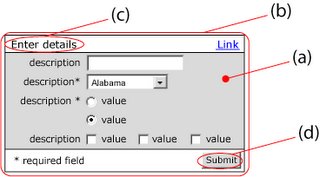


All Web Modules have the following items in common:

Header row
This row (normally with a contrasting background color to the page color) always contains the web module name but also can optionally contain contextually relevant links.

Descriptor
This is the verbal description of the content which the Web Module encapsulated

Content area
This box (normally with a different background color to that of the header row) provides a container for the actual web module content.

The following is a description of the three main type of Web Module.

The output Web Module
Output web modules as the name implies are containers for system output. The nature of this type of web module is to promote user consumption of information. However you will see in some cases the module content can include hyperlinks to enable navigation to further detail or associated content.

There are three common variations of output web module type:

  1. Message
    Typically this variation is used to display a system message. The content box is populated with free text which can optionally contain hyperlinks.
  2. List
    Typically this variation is used to display a link list. In this variation the content box is populated with a single repeating field.
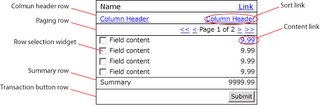
  3. Table
    Typically this variation is used to display a multi column table. Note: a column header row is required. Other optional features include: column header sort links, paging row, row selection widget (checkbox or radio button), content link, summary (added up value) row and transaction button row.

The multi Web Module
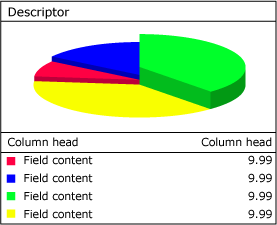
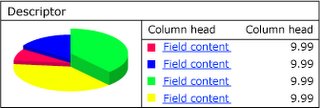
A relatively new player on the block this type of web module is used to display both visual and textual content in the same package. This type of web module is increasingly popular as it enhances the value of the content being displayed while decreasing perception of complexity.

Multi web module vertical variation

Multi web module horizontal variation

An essential ingredient of the multi web module type is the tight correlation between image and text content. The above illustration presents a classic multi web module implementation where the exactly the same content presented in the pie graph on the left is repeated in the table on the right. N.B. in this case users are supplied links to the value column amounts to drill down to more detail.

The input web module
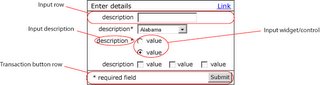
Input web modules as the name implies are containers for user input. The nature of this type of web module is to promote users to enter information. As previously mentioned user input can represent the most stressful part of a users experience with an application. As such an effective strategy to reduce and simplify user input can have a significant impact on usability.

The container box of an input web module always contains one or more input rows and a transaction button row. This model promotes a simple one column approach whereby the user completes the form by starting at the top and working his or her way down to the bottom to where the transaction button(s) are located.


Implication of Web Module support for Composer
It is my belief that Composer could add significant value to user by implementing Web Modules within the interface page in the layout panels pane…
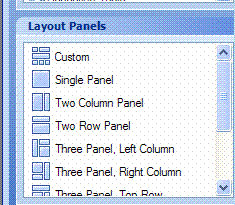


Currently to model Web Module a user must use one of the layout panels as the basis for building the required header row and content box. The addition of panels with associated properties configure optional elements could significantly speed up the development of interfaces while increasing consistency and conforming them to current best practices.

For example: I envision a new layout panel called "input Module". On selection of this panel the user would be able to drag a rectangle on the Interface Design pane and be left with the following result…


On right clicking of this object and selection of properties it would allow the user to configure the "Input Module". Configuration could include such things as:

  • Background color and height of header row
  • "Name" text and attributes
  • "Optional Link" management
  • Background color of content area
  • Background color of height of transaction row
  • Button management including alignment

Thursday, February 23, 2006

Issues No.3

3.1 - Performance degradation
Recently I have been noticing that the application has become slower and slower. Other applications that I am running such as OneNote and Outlook were not suffering the same performance degradation so naturally I assumed it was a Composer issue.

I started experimenting, turning network services off, removing extra projects in the projects folder, restarting the application, rebooting my laptop - nothing worked to make Composer faster. In the end I took a look at spare memory in the disc drive from which Composer is running and saw that it had only 1gig spare in the 10gig volume. I also found that this volume was also highly fragmented.

Since then I've removed a lot of data from the volume now have 2 or so gig free, de-installed Composer, defragged the drive and re-installed Composer.

The performance was initially excellent but now I am noticing it degrade again. It is particularly noticeable when trying to edit a text area. It would be great to be able to edit the value of a text area within the properties popup…


Currently when you change the name in the Text Area Properties it does not effect the text in the interface - another field here to enter the interface value would be great value I think.

We have already discussed the memory problem in a previous communication. We will look at adding another tab with rich text editor to enter this value.

3.2 - Modeling a shopping cart

I am in the process of modeling shopping cart functionality and am running into some issues. The following is snapshot of the activity flow…


The following is a simulation of the Shopping Cart interface...


a. I have disabled the links to the product detail (P900, P800) as this interface is covered in a different activity

b. I would very much like to enable user to change the "No." of units for each item and then with pressing of the "Update" button see the values for "Tax", "1x Amount", "Mthly Amount" and values in the total row to be recalculated and updated - is this possible and if so how do I do it?

c. The concept of a total row being supported by the repeating table control I think is very attractive - is this on the roadmap?

d. I have disabled the "Remove" link as currently I can't impact the test set from the simulation

At the moment, we don’t have any in-page actions or calculations. We also lack a true grid control where some of these calculations can be performed Both of these are on the roadmap for a future release.

3.3 - Adding repeating records into repeating table
The following is a snapshot of the activity manage saved shipping carts flow...


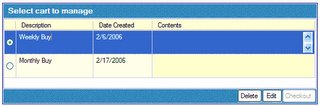
I would like user to be able to view an abridged list of items within a saved shopping cart. This requirement is part of the manage saved carts interface ...


I have created an Action output data model as such...


Note I have a repeating group inside the ShoppingCarts repeating group which contains three fields. In the Manage Cart interface I have added a repeating section to the "Content" column…


However for some reason when I drop the "Content" repeating table from the Activity Data for the LookUpSavedShoppingCarts activity nothing is added. Am I using the wrong approach to do this?

This is the same issue we already discussed, i.e. lack a local dataset and steps/controls to manipulate that data. Both are on the roadmap.

3.4 - Add current date as input I am modeling a function which allows users to save a shopping cart for later recall. As part of this process I would like to show the date stamp of the saved cart as part of the saving process…


Is it possible to assign the input to the current date? If not I believe this would be a useful addition.

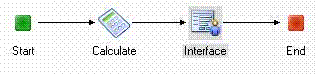
It is possible to get current date/time by using Calculate step with Date or DateTime output. There is, however, a bug in conversion between local and universal time (GMT) so the date end up off by multiple of the time zone offset (depends on circumstances). Good news is that it is possible to work around it by using AddHours function:


Add calculate, change result type to DateTime or Date and use the function as described.

You can show the result in either TextBox or DateTime picker, since it is for viewing only, readonly TextBox is probably right option. Attached example.

Issues No.2

Currently I'm trying to model a catalogue browsing experience. This experience includes two levels of drill, search and compare functionalities. Here is the flow diagram...


2.1 - Using dynamic link in repeating table to specify branch in decision

This requires the user to select a category...


Then a subcategory…


However I am unable to work out how to pass the content in the hyperlink to the decision so I can mockup results for both "phones" and "Accessories". In the decision editor I can only define the hyperlink as the "next" button…


This means currently no matter whether you select "phones" or "accessories" you will always end up down the Phones branch.

Of course even this multi branch approach I am taking is a problem as soon as the number of Categories grows large and really mucks up the final process model - I would very much like to be able to pass the link name to dynamically pick a test data set. I suppose the question I'm asking is - what is the best way to model multi level drill downs in Serena Composer?

Currently the only way how we can get around this is to use “hidden” fields in the repeating table as we described in our previous communication. But rather than putting the controls in a single column, it is possible to set column width to 0 and effectively hide the column. We also implemented changes to the Button/Hyperlink control to allow text to be mapped directly if the button action is not POPUP, meaning you no longer have to use the vertical line symbol ( “” ) to have the actual string reflected.

2.2 - Passing variable to interface using dynamic link

After navigating categories and subcategories the user is presented with a list of products...


The user can select an individual product to view its picture and details using the dynamic link in the "Model" column. However currently I cannot find a way to bind the data from this interface to the product details view…


Note: the text items on this screen have been defined as inputs.

This is the same problem/limitation we addressed above. Put all the details into hidden fields placed in columns with the width set to “0.”

2.3 - Retaining a dynamic link name.

After navigating categories and subcategories the user is presented with a list of products...


Should the user can select multiple products and press the "Compare" button the following comparison view is presented…


Note that the word "Hyperlink" appears where the Model No. should appear - I cannot figure out how to fix this. The mapping for this column is exactly the same as the previous view but for some reason does not pass the variable the same way.

Right now, the only workaround is to use the “hidden” field trick described above. In 2.3 we have fixed this limitation by allowing hyperlinks to support output mapping to downstream controls (i.e., whenever control has the “Has Input” checkbox enabled).

2.4 - How do I dynamically display a picture?

Have noticed that there is a "has input" feature in the image control…


In the case where I want to dynamically define which image is displayed is it just a matter of passing a text variable which exactly matches the name of an image in the content manager?

The current product doesn’t have the ability to map images dynamically, so the only solution is to fake it by having multiple interfaces.
We have changed this in 2.3 to allow input mapping to image objects in exactly the way you describe.

Wednesday, February 22, 2006

Working through some issues No.1

Recently I have developing a webapplication model using Serena Composer. During this process I have come across issues which I have documented and sent through to David Ruiz for his comments. I thought it might be interesting to publish these for all to see.

The following is the first such "issues" documents including David's comments:
1.1 - I would very much like to get all the breadcrumbs working in my simulation.

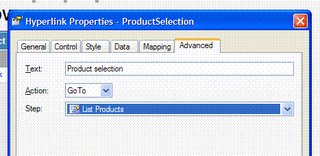
My assumption is that the "GoTo" feature...


...would be the way to do this. However it seems to populate the Step variable only with interfaces that appear in the current interface activity context. This means for me to have fully functioning breadcrumbs I need to create my complete simulation in the one activity - which does seem to devalue the ability of nesting activities considerably.

Is there another approach to creating interface hyper links that I do not know about?

Not currently. We will look at this to see if we can enhance the Go To function so it can navigate to any step in the current or parent activities. I’m hoping to get this into the 2.3 release.

1.2 - I am looking for a way to pass hidden variables.

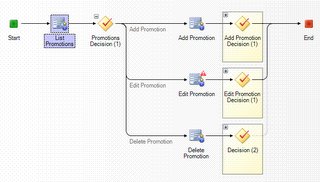
I have the following activity flow...


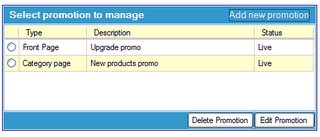
In this flow the user selects an promotion to edit by selecting the appropriate radio button and pressing the "Edit Promotion" button. Note the only fields presented in this list are: type, description and status...


The system then would present the details for that promotion, however promotions contain as you can see considerable more variables than those presented in the previous list table…


I am keen to pass the values for this other variables (asset, date scope and org scope) to this Interface from the list view - is this possible? And if so how do I do it? Currently I cannot see any way to create extra variables in the Test set that populates the repeating table in the List Promotions interface.

The only way to do this currently is to create the repeating table so it has all of the data contained within in it, but then hiding the fields/controls that you don’t want to see. An enhancement we are considering is allowing you to hide particular columns of a repeating table, so you don’t have to go through unnatural acts to get the prototype to work. Please see the attached project that Tomas (one of our engineers) put together that demonstrates this.


1.3 - I would like to make fully functioning simulations that would allow simulation users go through the process of adding, editing and deleting items and see the results of these actions on the system.

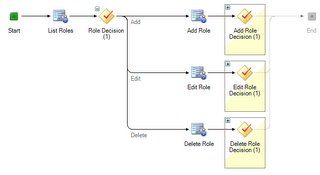
For example in the manage roles activity flow…


Let us take the case of a user adding a new role. The user would click on the "add new role" hyper link in the List Roles interface...


Then would be presented with a form to create a new role and enter all the relevant details...


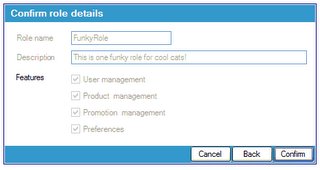
Then submit it and check to make sure it is good before confirming...


If the user were to then press "confirm" I would like to update the data in the test set to now contain a new role "FunkyRole" with all the appropriate details. This role should then be able to be edited and deleted as per normal. Is it possible to do this? If so can you please let me know how.

No, this is not currently supported but is a planned enhancement for the Composer 3.1 release. This will allow you to define local datasets for the project and support record-level operations such as Add, Delete, Insert records, etc.

1.4 - I am looking to populate a repeating table with hyper links for the Browse, search and compare activity…


The list category screen contains a repeating table...


I use the standard approach of creating a repeating table adding a control (in this case a hyperlink with the has input check box checked)...


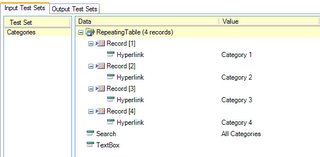
I have created a test data set...


And I have assigned this to a Browse scenario...


I make sure this "Browse" scenario is selected in the Activity before I simulate and I get the following result...


Obviously rather than get Hyperlink repeated four times I would like to see the values in the test set (Categories) appear. Is this a bug or am I missing something?

You can get this to work by inserting a vertical bar character ( ) in front of the value entered in the test set data (see below). This will have the value display correctly in the prototype.

Thursday, February 16, 2006

Some ideas for posts

Since starting this blog I have been thinking about subjects that would be interesting to PVC users. I'm currently thinking about developing posts on the following subjects:

Common web application design patterns
This post would start a discussion on common design patterns that we would all like to see supported to enable faster development of simulations.

RAIs and Serena Composer
It is my belief that Rich Internet Application technologies such as Flex and AJAX are likely to major factors in web app development in the next 12 to 24 months. As such I think it would be interesting to start a discussion on how tools such as Serena Composer will adapt to this change in the presentation logic layer.

How Do I's
From my perspective the most useful aspect of the Serena Composer documentation is the "How Do I?" section. These tutorials while very effective are still a little thin on the ground as such I thought it might be interesting to begin creating some of our own.

Do you have any ideas for posts in relation to Serena Composer or indeed software specification, simulation and high fidelity prototyping tools in general? If so please feel free to add into this discussion.

Wednesday, February 15, 2006

Welcome to Serena Composer users

This blog has been setup to provide a public forum for people using software specification, simulation and high fidelity prototyping tools - specifically Serena Composer from Serena Software.

If you who are currently using Serena Composer, looking to use it or just generally interested in requirements visualization and prototyping tools please read on and add your comments.

By making this public I hope we can all help illustrate how to use some of the fantastic functionality that resides in Serena Composer for future users and maybe even provide ideas on how to make to make it even better.

David Ruiz the product manager for Serena Composer and previously a co-founder of Apptero (which originated Composer) has promised to actively participate in the discussion generated in this forum. Also I live in hope that Serena will allow some of it's engineers to comment as they feel applicable.